

Clover Time Roblox icon Clover Time PLAY →

Clover Time Guide

Codes

How to Redeem Codes in Clover Time

Checked 12 October 2026 · Updated 2026-10-12

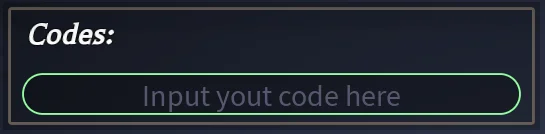
The official Settings screenshot shows a Codes input. The current Codes card lists strings marked Active but does not state a group-membership requirement or a complete menu path. This guide has not tested redemption in game.

Official Settings screenshot: Codes input with placeholder Input your code here
Codes field from the official Settings card, checked 12 October 2026. The screenshot is stored on this site.
Clover Time icon artwork
Match this icon on the Roblox page so you are in the right experience.

Redeem a Clover Time code

  1. Open Clover Time: Use the official Roblox experience for place 93934100402512.
  2. Find the Codes input: Look in Settings for the Codes input shown by the official card; the complete menu path is not verified.
  3. Enter a published code: Copy the exact string from the official Codes card and follow the on-screen submission control. Read any error for prerequisites.

Steps that match the board

Open the official Clover Time experience. Look for Settings and the Codes input shown in its official screenshot. Copy a current string from the Codes card, preserving capitals and punctuation, and follow the input’s on-screen submission control. The full navigation path and current prerequisites are not documented in the card text.

  • If an error gives a prerequisite, follow that in-game message. Group membership is not stated as a requirement in the current Codes card.
  • Whether the box is case-sensitive is not written on the card. Copy the printed capitals.
  • Use strings published for Clover Time; other games have separate code lists.
  • A code that only appears on a news site, and not on the Trello card, was never confirmed by the developer.

What a successful code does not do

The published SHADOW and NATCH rewards do not include a grimoire. SHADOW pays 30 Crystal Mana Spins, 2 Stat Resets and a +50% XP boost for 30 minutes. Rewards for the other eight listed strings are not published in the checked sources.

There is no official expiry clock or expired-code archive on the current card. A missing string is not proof of a particular expiry date. The in-game response determines whether a listed code works for your account.

Questions

Why does my code say invalid?

Confirm the experience is Clover Time, place 93934100402512, and copy the exact printed string. Read the error for any prerequisite. This guide cannot confirm current expiry or account eligibility from the card.

Where is the code box?

The official Settings card has a screenshot of a Codes input. Its current text does not document the complete menu path.

Keep going

Sources checked 12 October 2026